
Datasets
This page lists every dataset we use to test and benchmark MVIS, where to get it, and its licence.
- Where the data lives: the
calibench-vi/datasetsrepository on Hugging Face. Calibench is the name of our calibration benchmark. - What it hosts: our own VI-Rig recordings, two partner recordings, third-party sets whose licence allows
us to share them again (CC BY 4.0), and result files for some sets (
tum-fisheye/results/,uzh-fpv/results/,virig-5imus-4cams/results/). - What it does not host: all other third-party sets. For those, a download recipe fetches the files from the original site.
- Results: the reference results for each set are on the leaderboard and in
calibench-vi/results.
VI-Rig: our own recordings
Section titled “VI-Rig: our own recordings”We built the VI-Rig to research calibration of rigs with several cameras and several IMUs. An IMU (inertial measurement unit) is a gyroscope plus an accelerometer. Each dataset below is one sensor setup on the same frame, recorded as ROS1 bags (one bag per recording) while we move the rig in front of a calibration board.
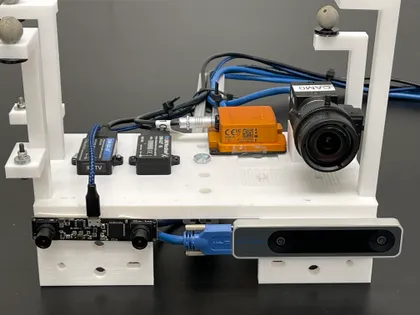
| Dataset | Cameras | IMUs | Board | Recordings | Size | Results |
|---|---|---|---|---|---|---|
| 4 IMUs + 3 cameras | Blackfly + T265 pair, all global shutter | 4, 100–500 Hz | AprilGrid | 10, 131–161 s | 76 GB | results · example |
| 4 IMUs + 3 cameras, ArUco | same 3 cameras | 4 IMUs (3 in recordings 11–17) | ArUco tags | 17, 102–139 s | 117 GB | not benchmarked |
| 4 IMUs + 4 cameras | T265 pair (global) + ELP stereo (rolling) | 4, 100–500 Hz | AprilGrid | 15, 131–152 s | 113 GB | results · example |
| 5 IMUs + 4 cameras | two T265 pairs, all global shutter | 5, 100–500 Hz | AprilGrid | 7, 41–64 s | 28 GB | results · example |
Terms used in the table:
- Global shutter: the camera exposes every row of the image at the same time.
- Rolling shutter: the camera reads the image out row by row, so each row has its own capture time.
- AprilGrid: a printed grid of AprilTags, square codes that the software finds and identifies in each image.
- ArUco: another family of square marker tags.
Licence and access
Section titled “Licence and access”- Licence: CC BY-NC 4.0. Free for research, teaching and other non-commercial use, with attribution.
- Gated: log in to Hugging Face and accept the terms on the dataset page. Access is granted at once.
- Benchmark exception: anyone, a company included, may run a calibration tool on these recordings to produce Calibench results and publish them with attribution.
- Other commercial use: needs a separate licence. Ask in the Community tab of the Hub repository or at licensing@openmvis.com.
Download
Section titled “Download”Accept the terms on the Hub first, then set HF_TOKEN to a read token from your Hugging Face settings (or log in once with hf auth login, after pip install huggingface_hub).
mvis datasets list # every dataset key, recording and sizemvis datasets download --select mvis_4imus_3cams/april_01 # one recording, 6.9 GB- Where files land: in
$MVIS_DATASETS(default~/Datasets). The example configs refer to the data as${MVIS_DATASETS}/.... - Checks:
mvis datasetschecks each file’s size and SHA-256 checksum. - Without MVIS: use the Hugging Face CLI; each dataset page gives the exact command.
Partner recordings on the Hub
Section titled “Partner recordings on the Hub”Two partners agreed to share their recordings under the same terms as the VI-Rig sets (CC BY-NC 4.0, gated, with the benchmark exception).
| Dataset | Rig | Recordings | Hub folder | On this site |
|---|---|---|---|---|
| Looper Robotics Insight 9 | 2 global-shutter mono cameras + 1 rolling-shutter colour camera + 400 Hz IMU | 10 ROS1 bags, AprilGrid | looper-insight9 | device · results · example |
| GiLabs examples | GI Ego1 and GI EGO1GS head-worn cameras: 2 cameras + IMU | 3 MCAP recordings, not in the benchmark | gilabs-examples | GI Ego1 · GI EGO1GS |
Third-party datasets
Section titled “Third-party datasets”These sets come from other groups. Each keeps its own licence and citation; please cite the original authors.
- Hosted: the calibration recordings of sets under CC BY 4.0, converted to ROS1 bags. A
.provenance.jsonbeside each bag records the source address, the source checksum and the conversion steps. - Recipe: we never copy these files. The Hub’s
recipes/download.pyfetches them from the original site and checks them. - Key:
mvis datasets download --dataset <key>also fetches from the original site and checks each file. For the hosted sets it gets the original archives;mvis datasets convertthen turns them into ROS1 bags. Urban fisheye and part of PennCOSYVIO have no checksum in the catalog; add--allow-unverifiedto fetch them unchecked.
| Dataset | Rig | Licence | How to get it | Original source | On this site |
|---|---|---|---|---|---|
| TUM-VI | stereo fisheye 1024² (and 512²) + BMI160 IMU | CC BY 4.0 | recipe · keys tum_vi_raw, tum_vi_standard_512 | TUM | results · example |
| Monado SLAM, MIC (Valve Index) | 2 fisheye + 1 kHz IMU | CC BY 4.0 | hosted: converted/tum_mic · key tum_mic | Collabora | device |
| Monado SLAM, MGC (HP Reverb G2) | 4 fisheye + 1 kHz IMU | CC BY 4.0 | hosted: converted/monado_mgc · key monado_mgc | Collabora | device · results · example |
| Monado SLAM, MOC (Samsung Odyssey+) | 2 fisheye + 1 kHz IMU | CC BY 4.0 | hosted: converted/monado_moc · key monado_moc | Collabora | device |
| TUM-VIE, frame cameras | stereo 1024² + BMI160 IMU | CC BY 4.0 | hosted: converted/tum_event · key tum_event | TUM | – |
| UZH-FPV | DAVIS346 + IMU; Snapdragon stereo + IMU | CC BY-NC-SA 3.0 | keys uzh_fpv_davis, uzh_fpv_snapdragon | UZH | results · example |
| TUM-Fisheye (Double Sphere) | 1 camera, 5 fisheye lenses | none stated | recipe · key tum_fisheye | TUM | Why kb4 · MVIS results on the Hub |
| TUM RGB-D | Kinect and Xtion RGB + IR cameras | CC BY 4.0 | recipe · key tum_rgbd_bag | TUM | – |
| PennCOSYVIO | GoPro, Tango and VI-Sensor cameras + IMUs | citation only | recipe · key penncosyvio | Penn | – |
| Urban fisheye (ImprovedOcamCalib) | fisheye and GoPro stills | GPL v2 | recipe · key fisheye_dataset | GitHub | – |
| EuRoC MAV | stereo + IMU | CC BY | Hub recipe only | ETH Zurich | – |
| TUM RS (rolling shutter) | rolling- and global-shutter cameras + IMU | none stated | Hub recipe only | TUM | – |
| Hilti 2022 | multi-camera + IMU | CC BY-NC-SA 3.0 | Hub recipe only | Hilti | – |
| Hilti 2023 handheld | multi-camera + IMU | CC BY-NC-SA 3.0 | Hub recipe only | Hilti | – |
- Exact sources and licences: see
recipes/SOURCES.mdon the Hub. - Add your own: see Submit a dataset.
Citation
Section titled “Citation”If you use the Calibench data, please cite:
- Calibench, for any of the data.
- The MVIS paper, for the VI-Rig sets with 4 IMUs (3 cameras, 3 cameras ArUco, 4 cameras). The 5-IMU set has no paper yet; cite Calibench for it.
- The original paper of every third-party set you use. The dataset card lists them.
The MVIS paper entry below is the same as on Contributors & citation, which also has the entries for the software and the benchmark results.
@misc{calibench2026, author = {Yang, Yulin}, title = {Calibench: Visual-Inertial Datasets for Calibration Benchmark}, year = {2026}, howpublished = {Hugging Face Datasets}, note = {https://huggingface.co/datasets/calibench-vi/datasets}}@article{yang2024mvis, title = {Multi-visual-inertial system: Analysis, calibration, and estimation}, author = {Yang, Yulin and Geneva, Patrick and Huang, Guoquan}, journal = {The International Journal of Robotics Research}, year = {2024}, volume = {43}, number = {13}, pages = {1995--2026}, doi = {10.1177/02783649241245726}}