
Camera calibration
Camera-only calibration: intrinsics, distortion, extrinsics, time offsets, and rolling-shutter readout, solved jointly. This is also step one of camera–IMU calibration, which consumes the result.
1. Make a target
Section titled “1. Make a target”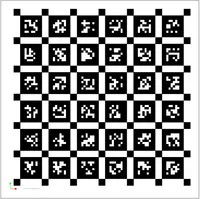
| Board | board_type | Required fields |
|---|---|---|
| AprilGrid | apriltag | rows, cols, tag_size (m), tag_spacing (ratio), tag_family |
| Chessboard | chessboard | rows, cols (inner corners), square_size (m) |
| ArUco | aruco | rows, cols, marker_size, marker_separation, aruco_dict |
AprilGrid follows the Kalibr 2-bit border convention, and Kalibr target YAMLs
load directly via apriltag_board.from_kalibr_yaml.
2. Record
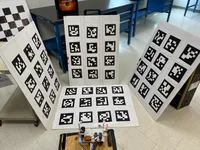
Section titled “2. Record”Fill the frame and cover the image to its corners — distortion is only constrained where tags were actually seen. Vary distance and angle; avoid motion blur.
3. Point the config at your data
Section titled “3. Point the config at your data”Six input formats, all streaming one image at a time so memory stays bounded regardless of dataset size:
cameras: - camera_id: 0 source_type: images # a folder, sorted by filename source_path: /path/to/cam0_imagescameras: - camera_id: 0 source_type: rosbag_topic # ROS1 — several cameras from one bag source_path: /path/to/data.bag topic: /cam0/image_raw - camera_id: 1 source_type: rosbag_topic source_path: /path/to/data.bag topic: /cam1/image_rawcameras: - camera_id: 0 source_type: euroc # EuRoC / ASL — TUM-VI, Monado SLAM source_path: /path/to/cam0Also available: timestamped_images (folder + CSV) and ros2bag.
4. Pick a distortion model
Section titled “4. Pick a distortion model” distortion_model: equidistant # radtan | equidistant | fov # double_sphere | eucm | omni_radtanradtan for normal lenses, equidistant for fisheye. Models can be mixed
across cameras in one rig. The trade-offs — and the wide-FoV divergence to
watch for — are in Camera model.
5. Run
Section titled “5. Run”mvis calibrate --config config.yamlWhat the pipeline does
Section titled “What the pipeline does”Worth knowing, because the failure messages name these stages:
| Stage | What happens |
|---|---|
| Detection | Adaptive multi-scale AprilTag — probes scale 1.0, then up to 2 adaptive scales by observed module size; subpixel refinement at original resolution |
| Quality gating | Corner subsample, pooled-pose filter (≥20% tags across cameras), per-corner ≥5 views, per-camera ≥3 views, ≥6 tags/frame |
| 1 | Per-camera init — vanishing-point focal + RANSAC PnP board poses + sanity check |
| 2 | Per-camera GTSAM refinement, with rolling-shutter readout if enabled |
| 3 | Trajectory alignment — extrinsics via RANSAC, time offsets via dual PnP + homography cross-correlation |
| 4 | Joint multi-camera factor graph — the unified factor, all parameters |
| 5 | Outlier-driven rerun with pathology guardrail |
corner_subsample defaults to top_left: one corner per tag instead of four,
3–5× faster for under 0.1% quality drift, validated across eight dataset
families. It auto-falls back to all on sparse data.
corner_subsample: top_left # top_left | two_diag | allfactor_hz subsamples frames if a long recording is slowing you down.
6. Read the report
Section titled “6. Read the report”Two YAMLs — *_calib.yaml to deploy, *_full.yaml with board poses to
replay — plus a self-contained HTML report. Check the motion-excitation
grade before the reprojection error: see
Evaluation & metrics.
Multi-camera
Section titled “Multi-camera”Add entries to cameras: and set reference_camera. There is no separate
stereo step — all cameras enter one graph, so a five-camera rig stays
consistent instead of accumulating pairwise error. Enable
optimize_time_offset: true for unsynchronised cameras.
Add an IMU: Camera–IMU calibration.